The M1KE device one of the best sounding MMDVM devices on our network. The “Mic” has the ability to raise low level audio up the DMR Mic gain level. Be careful not to enable and use the Loudness at more than the minimum value of 1%.
To help make changes or to set your values, please use both the Parrot and LUFS meter that PNWDigital provides while testing for the best settings.
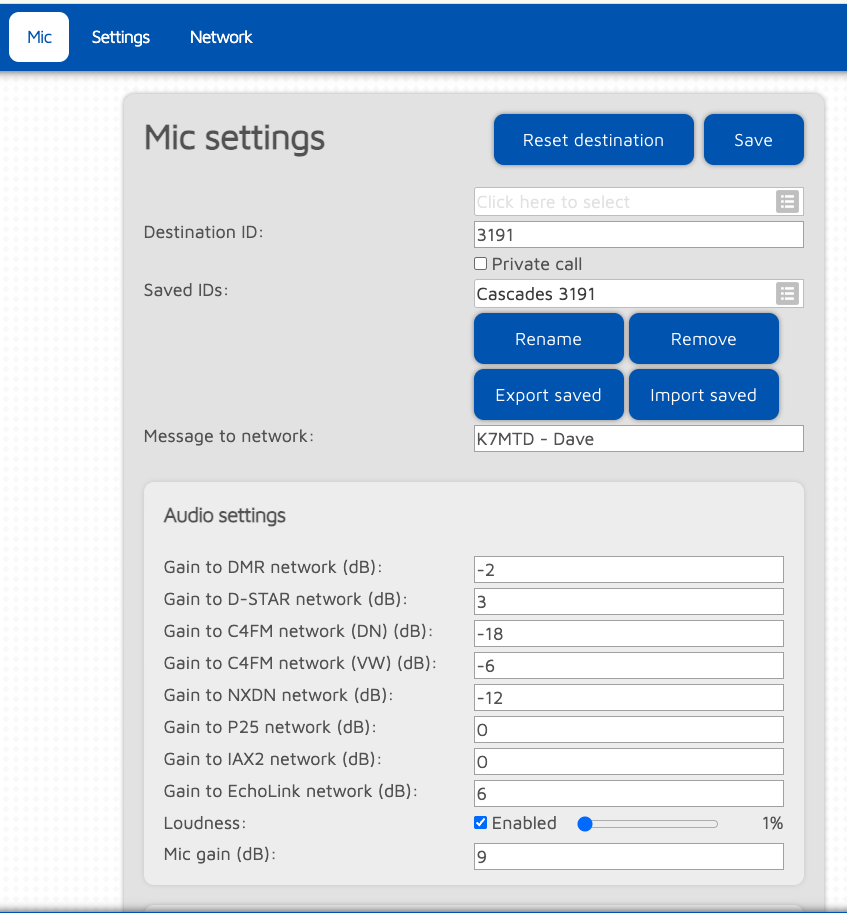
The check or change those levels, go to Mic/Mic Settings and look for “Gain to DMR Network (dB)” and start our at -2 or -3.
For “Loudness”, set it to the minimum setting of 1%.
More information will be posted/updated later.
If you know the default or factory settings for the DMR Mic Gain and the Loudness setting, please pass it along to the PNWDigital team.
Views: 352